Rob Kraft's Software Development Blog

Software Development Insights

Binary Serialization Notes in .Net 4.0

Posted by robkraft on December 5, 2011

I ran into a problem using binary serialization recently.  Some of the objects that I was serializing were really large.  By really large I mean that they were 2,000,000 bytes long instead of the expected 2,000 bytes long.  I could not find a good source of information about binary serialization other than this fine article:  http://www.diranieh.com/NETSerialization/BinarySerialization.htm
But even that article left we with questions.  I ended up writing tests to find my answers.  Here are my notes:

  • In Binary Serialization, fields are serialized (in XML serialization they are not).
  • Properties are serialized in both Binary and XML.
  • In Binary Serialization, if you add a property for the field, the field and property are not both serialized (at least for simple properties).
  • Static fields and properties are not serialized.
  • Private fields ARE serialized in Binary Serialization.
  • Properties without setters (ReadOnly properties) are not serialized.
  • Make sure that you do not serialize events.  That is what caused my objects to grow 1,000 times larger.

Make sure to apply this attribute to any events you define:
[field: NonSerialized]
public new event System.ComponentModel.PropertyChangedEventHandler PropertyChanged;

We also wrote unit tests to make sure our objects did not experience unintended excessive growth in the future:

   1:  [Test]
   2:  public void TheSizeOfOneModuleShouldNotExceed25000bytes()
   3:  {
   4:  var module = ModuleList.GetByModuleID(3);
   5:  long lBuffer = 0;
   6:  using (MemoryStream buffer = new MemoryStream())
   7:  {
   8:   BinaryFormatter formatter = new BinaryFormatter();
   9:   formatter.Serialize(buffer, module);
  10:   lBuffer += buffer.Length;
  11:  }
  12:  Assert.That(lBuffer, Is.LessThan(25000));
  13:  }


Posted in Coding, Visual Studio 2010 | Leave a Comment »

Encapsulating code in business objects almost always means better code

Posted by robkraft on December 3, 2011

Good examples of better coding are not always easy to find, but here is one.  A good coding principal is to encapsulate business logic in business objects instead of including business logic in the user interface.  This is the foundation of coding using object oriented principles.  One specific example is to compare these two ways to write the same code:

 1: buttonDelete_click()
 2: {
 3:     If myObject.HasChildren then
 4:         ShowMessage("You can't delete an object with children.")
 5:     End if
 6: }
 7:  
 8: buttonDelete_click()
 9: {
 10:     If myObject.AllowDelete = False then
 11:         ShowMessage(myObject.ReasonDeleteNotAllowedMessage)
 12:     End if
 13: }

The first code sample may be the first to come to mind, but the first solution that comes to mind is often not the best.  The second code sample is superior because it places the logic for AllowDelete inside the business object, and thus it makes that logic re-usable in other places.  Perhaps you have an import utility that could use the same logic, or perhaps you want to write unit tests.  In the second example, you can write unit tests to make sure that the AllowDelete property is being set correctly; but the first example would require UI testing to confirm this.

In my example, the code inside of the .AllowDelete property probably looks like this:

 1: Public bool AllowDelete()
 2: {
 3:     If (this.HasChildren == true)
 4:         Return false;
 5:     End if
 6: }

By placing this logic in the business object, it would be easy to expand it later and the additional logic would apply to all user interface and batch processing code that uses it.

Any time you can encapsulate some logic within an object, it is probably worth the smalladditional amount of time to do so.

Posted in Code Design, CodeProject, Coding | 1 Comment »

The Next Generation of User Group Meetings

Posted by robkraft on December 2, 2011

In the Kansas City metro I’ve noticed an increase in the number of computer user groups forming to meet and discuss and learn about software technologies.  Some of these groups have exploded on the scene with an average attendance of more than 30 people per meeting, which outdoes groups that have been existing more than a decade with less than 10 people per meeting.

But I think it is time to try to do more.  I think we can do a better job.  I think the goal is to increase the knowledge of technologists about all the things they are interested in; and I’ve noticed that some of the most popular meeting topics are about “other things”.  For example, training on Ruby at the .Net meeting produces a large crowd; and training on IIS at the Java meeting produces a large crowd.  Why is that?  I believe it is because most developers recognize the need to have at least some knowledge of the tools they don’t regularly use.  By raising our own awareness of other tools and techniques, we are open to more possible ways to solve problems.  More importantly, after we have learned the basics and some pros and cons of a new tool or language, we are less intimidated by that tool or language and more open to consider using it in future projects.

What does this all mean for user groups?  I believe that we should continue to have the “Special Interest Groups” to focus on the arcane and specific features of the group’s named technology.  But I believe we need a general interest group that presents tools and technologies at a high-level (introductory level) that can be marketed to the entire community of developers in the metro.

How do we go about this?

  1. We need to find a venue to host these meetings.  My hope is that we can draw 50 to 200 people at each meeting.  Therefore, we would want a venue that can accommodate such a crowd.
  2. We need to identify topics of presentations that can be presented as introductory material to this large audience.
  3. We need to find good presenters that are enthusiastic about presenting and answering questions on these topics.  In addition, the      presents will probably, but not necessarily, need to create the presentation.
  4.  We need to get the word out to all IT people in the KC Metro about the event.  And I want to jump on my soap box here and say that the goal is not to get as many bodies as possible at the event; the goal is to make everyone in the KC Metro that might be interested in this topic aware of the opportunity to learn.
  5. We need coordinators to bring all these elements together at the same place and time.
  6. Optionally, we could obtain sponsors to help pay venue costs if any, and to provide food, drinks and prizes; but I don’t believe that food, drinks, or prizes are necessary to draw the crowd.
  1. Now I am not sure what venues can hold this many people.  I believe that JCCC could do it, and probably would be open to it; but their business needs usually come first.  Red Nova Labs and VML both seem to have large venues, but I don’t know if they are large enough.  Can you suggest other venues?
  2. The list of potential topics is long.  I will start a list with these items: TDD, Agile, Kanban, Starting in Ruby, Perl, JavaScript, Jquery, HTML5, CSS3, SQL, Unit tests, Inversion of Control, Asp.Net, MVC, MVVM, SQL Injection and XSS, Starting in .Net, Starting in Java.
  3. The list of good presenters is also long.  In fact, the current local user groups, those that I collectively refer to as Special Interest      Groups, could serve as the training grounds for finding presenters.  If you know someone that gave a great presentation at a local user group, then recommend that person and their presentation for the new general interest group.  Also we need to hear from presenters      about topics they would like to present.
  4. We already know several ways to get the word out.  www.KansasCityUsergroups.com, and www.kcitp.com and linkedIn.  We would, of course, set up a simple web site with info about the upcoming event.  We could contact all the local groups and have them announce the meeting.  We might also spread the word by creating a meetup for the event.  We could start a twitter hash tag as well.
  5. We need people to do these things.  I believe that if we can get 5 to 10 people behind this to do the work, it will be enough to make it happen and those 5 to 10 won’t get burned out.  Personally, I would like to be one of the marketers to spread the message about the upcoming meetings, and I hope Mike Gelphman would work with me.  I would leave it to others to find the venue, topic, and presenter.
  6. If a vendor reads this blog and wants to step forward, then please do so.  Of if you want to contact potential sponsors, please do so.  They are certainly welcome, especially if we incur venue costs that the sponsor will pay for.  But this is primarily about increasing the skill levels of our technologies and those making technology decisions, not about selling products.

The OWASP group has a pretty good speaker agreement that I believe we could copy for this group as well.  Perhaps a similar agreement from venue host and sponsor would be helpful. https://www.owasp.org/index.php/Speaker_Agreement

Who wants to see this happen?  Who wants to be a driver to make this happen?  Let’s make the software developers in the Kansas City metro the best in the world!

Posted in CodeProject, Coding, Project Management, Resources and Tools | Leave a Comment »

How to fix SQL Server Profiler Error opening trace file from 2008R2 server

Posted by robkraft on November 18, 2011

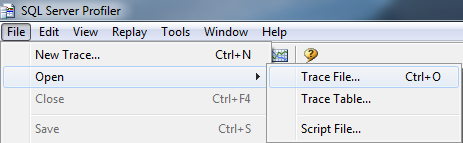
I received a SQL Profiler trace file from a client in order to analyze activity on their SQL Server.  When I attempted to open the file, I received a helpful error message that began, “Unable to locate trace definition file Microsoft SQL Server TraceDefinition 10.50.0.xml…”.  This happened because my client is running SQL Server 2008 R2 but I am running SQL Server 2008.  I had the client sent the Trace Definition file mentioned to me: “D:\Program Files (x86)\Microsoft SQL Server\100\Tools\Profiler\TraceDefinitions\Microsoft SQL Server TraceDefinition 10.50.0.xml” and I copied that file into my “C:\Program Files (x86)\Microsoft SQL Server\100\Tools\Profiler\TraceDefinitions”.  Copying it to this folder required admin permissions.

I then went back and double-clicked on the trace file (.trc) that the client had sent to me and I received this error:

“Unrecognized command line argument.  All command line arguments will be ignored.  Please run ‘profiler.exe -?’ to see a list of valid command line arguments.” I have not resolved this error, and don’t plan to.  I was able to open the trace file by first opening SQL Server Profiler, then using File Open and selecting the .trc file.

Posted in SQL Server | 1 Comment »

Don’t let Hackers Configure Your Router, Turn off UPnP

Posted by robkraft on October 23, 2011

Add this step to hardening your home and work networks against attacks from the Internet:

  • Turn your router’s UPnP off.

I previously thought that making sure all ports on the router were closed was sufficient to block attacks from the Internet, but it is not.  If your router supports UPnP, which most do now, you should disable this feature as recently reported by Daniel Garcia at H-Report.com:

http://www.h-online.com/security/news/item/UPnP-enabled-routers-allow-attacks-on-LANs-1329727.html

If you can disable UPnP on the WAN side of the router, do so.  If this isn’t possible, disable UPnP completely on the router.  UPnP is rarely needed by most users, but online gamers may benefit from UPnP to more easily connect to online gaming networks.

This article shows how to turn off UPnP in common Linksys routers:

http://www.informit.com/articles/article.aspx?p=461084


Posted in Home Tech, I.T. | Leave a Comment »

Here is why we write poor quality software.

Posted by robkraft on September 8, 2011

The problem:
You need to read the value of a property that is in a class in another project.  The property scope is internal making it inaccessible to your class.  Do you do the right thing?

Writing quality software implies that you are making the correct coding decisions.  But a lot of factors may induce us to make an incorrect decision.  In this example, any of the following may happen:

  1. The developer simply changes the property scope to public because the developer is under a lot of pressure to complete the task as quickly as possible.
  2. The developer simply changes the property scope to public because the developer is a junior developer and doesn’t even conceive that this may not be the best thing to do.
  3. The developer simply changes the property scope to public because the developer assumes that the internal scope of the property must be an unintentional error.
  4. The developer simply changes the property scope to public because the developer believes himself to be a great developer and he sees a quick resolution to the problem and implements it.  Great developer status confirmed once again.
  5. The developer simply changes the property scope to public because the developer morale is low and the developer is not concerned with the quality of the software.  Besides, it is unlikely any negative impact of this change will be realized and thus attributed to the developer.
  6. The developer simply changes the property scope to public because he talked to other developers or the lead developer/architect and they determined that the internal scope was either in error or unnecessary.
  7. The developer uses the InternalsVisibleTo feature to make the property accessible to his class because the developer understands that we may desire to keep the property scoped internal, and the developer is familiar with this technique for accessing internally scoped properties.
  8. The developer uses the InternalsVisibleTo feature to make the property accessible to his class because the developer talked to other developers or the lead developer/architect and they determined that using InternalsVisibleTo was the best way to preserve the desired internal scope.
  9. The developer has his code make a call to the database to get the same value that the other class’s property would have returned because he is very comfortable writing code to make database calls and writing SQL and is less comfortable with these ideas of object-oriented programming.
  10. The developer has his code make a call to the database, or uses a different business object because he talked to other developers or the lead developer/architect and they determined that the property and class he originally intended to use for the value were not the best/correct way to obtain this value.

From the ten options I provided above, there are basically three different ways to write the correct code, but only one correct answer.  Do you see the three different ways to write the code?  Do you see the correct answer?  The three different ways to write the code are:

  1. Change the scope of the property to public,
  2. Use the InternalsVisibleTo feature to access the property,
  3. Find an alternative solution to the problem that does not use the internally scoped property.

But there is only one correct answer, and the correct answer is to take the time to do the research to determine the correct answer.  I worded it as “the developer talked to other developers or the lead developer/architect and they determined” in each case.  Of course, the developers familiar with the architecture can probably choose the correct solution without consulting their peers, any developer that makes a decision without knowing the architectural reasons is only going to get it correct if they are lucky.

Side note: the true correct approach is the one that gets it right in the least amount of time; therefore it
would be any approach that does not take time to consult peers or consider the architecture, but just happens to be lucky enough to get it right anyway.

This article is not an article about classes and properties.  It is an article about some of the ways that code quality deteriorates.  The specific example is provided for clarity, especially for .Net developers.

  1. In the first case above, the developer succumbed to time pressure and possibly chose an incorrect resolution for the problem.  I suspect time pressure is a major source of low quality code.  Developers often understand that a better solution may be available, but that time is required to evaluate alternative approaches.  The approach taking the least amount of time is the approach they already can see how to implement.  Furthermore, it is sometimes more important to implement a feature incorrectly and get it to production and fix it later than it is to delay the release in order to implement the feature correctly the first time.  Developers often see that the solution they are implementing may not be ideal, but that it is good enough and that you may discover after several days of analysis that the unanalyzed first approach was the correct approach anyway.  When poor quality code enters production to meet a deadline, the quality failure is partially the responsibility of the developer because he should push back on the time pressure before writing code of poor quality; but it is also the responsibility of the lead developer or architect to make sure that quality is not lost in critical places, and it is also the responsibility of the product owner and project manager to allow the software to meet all requirements, not just time schedule, but also quality levels.
  2. In the second case, the developer simply lacks experience or is unaware.  I don’t know of any steps a person can take to become aware of what they are unaware of.  This is why developers coding in new languages, paradigms, and architectures should have mentors, pairing partners, and code reviews.  This quality failure occurs due to a flaw in the software development process, not the developer.
  3. Case three and four both occur when the developer believes he already knows the answer.  This is why “Knowledge is the greatest barrier to learning.”  If you think you already know the answer, you will not think to look for a better solution.  This quality failure is primarily the fault of the developer, but it is partially the responsibility of the team lead to understand the nature of this developer and the possible flaws that the developer is prone to; especially if the developer is young and inexperienced.  It is also possible that development processes, particularly some unit tests or static analysis, could identify specific incorrect alterations to the code.
  4. Case five occurs when the developer is dissatisfied with the company, or his career with the company, or with the particular project, with other developers on the team, or possibly even with aspects of his life outside the work place.  Both the individual developer and the company are responsible for employee morale.  I think some people make the mistake of claiming that the morale is the full responsibility of the company, but I disagree.  I believe that the company is a primary contributor and needs to address morale as a top priority; but most of us know people that will be unhappy and complain no matter how well they are treated.  Morale could be the most important contributor to quality code.  When your employees are engaged in the software and feel ownership for the software and when they know the end-user clients and how the software helps them, the employees are more likely to strive to provide quality software.  But when employees are treated as a necessary and expensive component on an assembly line that cranks out software to anonymous people, they are less likely to be concerned about the quality of the code.
  5. Case seven is very similar to case three and four.  A little knowledge is a dangerous thing.  Developers with some experience learn multiple ways to solve the same problem, but they may still not understand which implementation to use for specific scenarios, and thus they may choose the wrong one.  This quality failure is the responsibility of both the developer and the lead developer/architect.  Developers that are aware of a choice to be made, but are not totally sure which option to choose, should ask the lead developer for clarification.  It is also the responsibility of the lead developer to let other developers know that he is receptive to such questions, and it is the responsibility of the architect to educate developers about the goals and priorities of the architecture so that developers have the knowledge to make the correct decisions on their own.
  6. Case nine is similar to case two, but this usually applies to developers with years of experience writing code a certain way that are now faced with writing code in ways they are not as familiar with.  These are often senior developers with a good understanding of the business domain and business needs and they can envision many solutions to the problem, but they have not bought into some of the priorities of the architecture.  Getting developers to change their ways after years or decades of developing working solutions using other techniques is certainly a challenge, and the responsibility for making sure these developers write quality code falls on the shoulders of both these developers and the team leaders.  Team leaders need to provide education to these developers about the benefits of doing things a different way.  Senior developers need to be open to trying things a new way, and accept developing more slowly during their learning curve in order to eventually see the benefits of the new approach.

On a final note, some people may wonder why I chose such a trivial problem for my example, and two responses spring to my mind.  Primarily, I chose this because it is a real-world example that I think most .Net developers can easily understand.  Secondarily this could result in a major problem if the internally scoped property contains sensitive data like a social security number or credit card number.  It is some of the smallest and most minor changes that often open security vulnerabilities in software that was previously regarded as secure.

Posted in Code Design, CodeProject, Coding | 2 Comments »

A Junior Developer’s Perception of Code Complete.

Posted by robkraft on September 4, 2011

Junior developers often think they have successfully completed coding a feature when they test the feature and it works for them.  Experienced developers are not so quick to consider their task complete.  Experienced developers are aware that a working feature specifically means that it works on their development platform, but before the feature is truly done, more aspects should be evaluated.

  • Does it work on other platforms? (Both 32 and 64 bit Operating Systems?, Multiple OS versions such as both Windows XP and Windows 7, multiple browsers such as IE9, IE8, FireFox 4, and Chrome)
  • Is the code secure, does it open risks for SQL Injection, XSS, or other attacks?
  • Does the code perform well under all expected conditions, such as when there is a lot more data in the database or multiple users?
  • Does the source code follow the patterns of the other source code in the project/development shop?
  • Does the source code pass StyleCop and FXCop tests?
  • Does the code have unit tests covering it adequately and do those tests all pass?
  • Is the code easy to maintain, support, and enhance?
  • Finally, most importantly, does the code do what the customer wants?

Posted in Code Design, Coding | 1 Comment »

In home wireless cameras for less than $100 part 2

Posted by robkraft on August 27, 2011

My wife and I liked this camera so much that we bought a second camera.  Configuring the router to allow a second
camera is a little more complicated, so I thought I’d share my experience here.

  1. I discovered  a camera feature I did not know about once I bought my second camera.  The camera has a physical focusing lens on the front of the camera, you can spin the camera cover to improve the focus; so make sure you take a moment to do that to improve the image quality.
  2. With two cameras taking images based on motion detectors I decided I wanted to put the images from the second camera in a different folder on my FTP site.  This was easy to do, but I discovered that the path to my FTP site is limited to just 32 characters.  This is probably sufficient for most people.
  3. By default, your camera uses Port 80 to connect to the Internet, but if you are viewing two cameras from the Internet, they both cannot use Port 80.  You also cannot use a DMZ feature in your router that passes all traffic from the Internet to a single device.  Instead, you need to configure filters to tell your router to pass traffic coming in on one port (80) to one camera; and tell your router to pass traffic coming in on another port (I used 81) to the other camera.  Internally, I statically assigned 192.168.0.30 to one of my cameras, and 192.168.0.31 to the other.  Therefore, I configured Port 80 on my router/firewall to send traffic to 192.168.0.30; and I configured Port 81 on my router/firewall to send traffic to 192.168.0.31.  When we use the Internet to connect most any device, the Internet uses Port 80 by default; which means that we don’t need to type in the port number when we go to a web site like http://www.yahoo.com:80.  The same is true for your camera.  But since the second camera is listening on a different port (81 in my case), I need to enter the Port number on my URL when trying to view the camera from a web page or configuring it for viewing from my phone.  I simply enter http://xx.xx.xx.xx:81 and when the request from the Internet hits my home address of xx.xx.xx.xx, my home router will direct the request on Port 81 to the device at 192.168.0.31 as I configured it above.
  4. In my original blog post I had created an “Event config – schedule profile” that I used on my motion detector.  This is unnecessary for me because there is an “always” option you can choose in the “Event config – Motion Detect” configuration; which is what I desired anyway.
  5. If you do create an “Event config – schedule profile”, you must give it a name first, and then you must click on it to select it before the options for configuring your profile will appear.

Posted in Home Tech | Leave a Comment »

Are you a developer, or an architect?

Posted by robkraft on August 21, 2011

I don’t care about job titles, but I do believe that a difference exists between a developer and an architect.  One difference may be just a matter of the perspective used to solve a problem.  Senior developers and architects have domain knowledge about how easily certain features can be implemented, whether the feature is already built into the application, or how best to modify the app to implement the feature.  The architects will consider spend more up front time thinking of an implementation strategy that maintains good code; while developers focus more on writing code in the quickest way possible to get the job done without changing the architecture.  Ultimately, years of developer enhancements without looking at the code as an architect usually leads to spaghetti code.

For example, when looking at some code as a developer, you can see that you can fix the bug or add the new feature by adding another IF statement in the current IF block to handle a new condition, but when looking at the same code as an architect you can see that a block of logic should be extracted into a separate method possibly reducing the current number of branches within the current method.

Posted in Code Design, Coding | Leave a Comment »

The Importance of your Development Context

Posted by robkraft on August 9, 2011

Development context places the primary constraints on the priorities of product development.  As a developer, you can provide more satisfaction to your users when you understand the development context you are working in.  Some developers are not even aware that context exists and that context makes a difference.  These developers can be found at local user group meetings and on forums adamantly declaring that their approach to solving a problem is the only right approach.  But development context is important and it does influence the best approach to solving problems.  An extreme context example is the difference between developing the software that keeps a person on life-support alive, and developing software for your personal use to keep track of your collection of rare coins.  I’m sure you can identify many aspects of the development process that will vary between these two extremes.

Both development teams and projects have a context.  Most often, the context for the development team and every project is the same, but occasionally the development team may be thrown a project that needs to follow a different context than their usual development.  Being aware of the different context opens team members to new approaches to solving to the problem that may be more efficient than the usual development process, and that may provide a learning opportunity.

I have thought of a few contexts that influence the development processes:

  • Quality versus early to market.  In some contexts it is more important to release features to market, even unfinished or unpolished features than it is to provide a robust, bug-free, fully-featured product to the client.  Quick to market features sometimes help eliminate development waste.  How so?  When you don’t bother to spend the time to polish a feature (spell-check, languages support, tab orders, font sizing support…) and then you discover that clients want the UI to look a lot different; you have just saved the time that you would have wasted polishing a UI.
  • Some development teams develop core business applications year after year, but then receive one project that is different.  Perhaps it is a one-time program needed to collect and report on some data, and then the program will be thrown away.  Perhaps the program is only used by one individual.  Such a program may not need the same level of Q/A, documentation, user testing, auditing, logging, security, etc. as the core business applications.  This is another example of context difference impacting development architecture and processes.
  • Another aspect of the development context is the attitude toward new technology.  There is no correct attitude, but each attitude has its benefits and drawbacks, and each project and development team should clarify the attitude for each project.  By attitude, I am referring to the choice between using tools, techniques, and processes that you are familiar with, that are more predictable, and that incur less risk OR choosing new tools, techniques, and processes in order to keep up with the times, take advantage of ways to improve quality and speed development (usually after a learning curve).  Some teams strive to stay on the cutting edge, others prefer to make no changes, especially to valuable stable core business products, and some teams prefer to limit their pace of technology adoption to the things offered by their main technology provider such as Microsoft.
  • Occasionally self-education and learning affect the processes, architecture, and tools used for a project.  Some examples include implementing a project using SCRUM when your normal development process does not use SCRUM.  Using Test Driven Development (TDD) is another example.  Using a new DBMS or programming language can affect your context, as can a switch to using IOC containers, MEF, MVC, or MVVM.  When part of the project goal is to learn something new, it can reduce development speed and introduce quality defects.  Project managers should be more tolerant of quality defects and deviations from the usual development processes as new good practices are discovered in response to the changes.

I think it is worth repeating that the development context affects a lot of things, particularly requirements gathering, quality assurance, documentation, user testing, application logging, application security, application auditing, and more I’m not thinking of.

What else do you know that alters a development context, and thus the way we develop the software?

Posted in Code Design, Coding, Project Management | Leave a Comment »

 
Design a site like this with WordPress.com
Get started