Rob Kraft's Software Development Blog

Software Development Insights

How to POST to a REST API that requires Authentication using Fiddler

Posted by robkraft on March 8, 2013

Last October I blogged about using Fiddler to Post to a REST API. Today’s post is very similar but I go one step further and post to a REST API site that requires Basic Authentication. When making a POST to a site requiring authentication, you must include authorization information in Request Header. Sounds simple enough, until you look at an example. In Fiddler, it looks like the image below:

Fiddler Post To Site Needing Basic Authentication

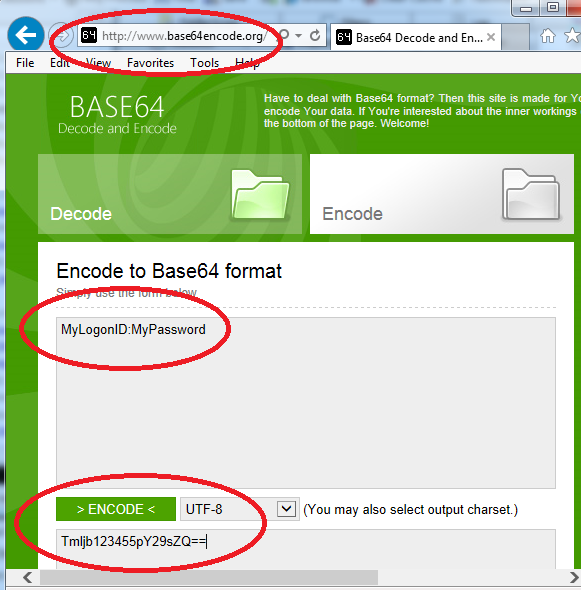
The only piece of information you need to add to make Basic Authentication work is the Authorization: Basic line with the correct encoded value following it.  Despite my warning, this encoded value is easy to generate.  You just need to go to any web site that will do base64 encoding for you, plug in your logon and password using this format:

logon:password

Click the button to encode to Base64 (probably UTF8), and paste the resulting value into Fiddler.  I did this at http://www.base64encode.org as shown here:

Image of Base64Encode.org web site

Image of Base64Encode.org web site

Posted in CodeProject, Coding, Free tools | 2 Comments »

The Correct Way to Re-Throw An Exception – .Net Tip

Posted by robkraft on March 6, 2013

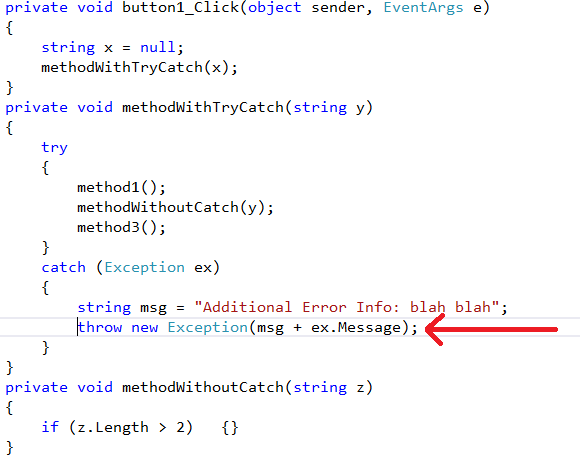
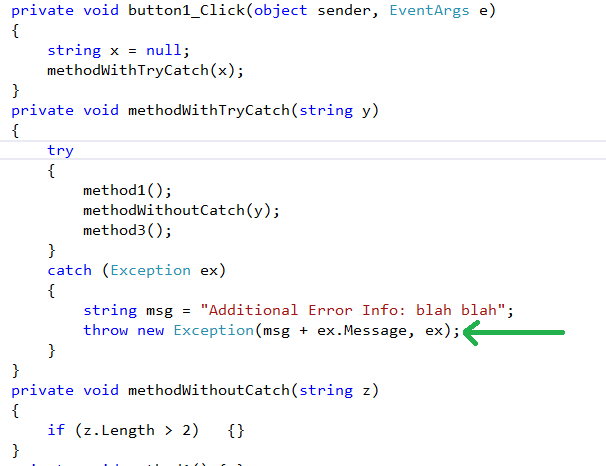
When catching and re-throwing an exception, you should include the original exception as a 2nd parameter.  Including the original exception may provide a deeper stack trace that will assist you with solving the exception.

This syntax may not include the full stack trace.

This syntax may not include the full stack trace.

In the code above, if an error occurs in methodWithoutCatch(), the call stack returned will show “methodWithTryCatch” as the deepest method in the stack.

System.Exception: Additional Error Info: blah blahObject reference not set to an instance of an object.
at WindowsFormsApplication6.Form1.methodWithTryCatch(String y) in ...\Form1.cs:line 34 at WindowsFormsApplication6.Form1.button1_Click
This example will include the full call stack.

This example will include the full call stack.

However, if you include the original exception in the throw as shown in the second throw example, then the call stack returned will show “methodWithoutCatch” as the deepest method in the stack.

System.Exception: Additional Error Info: blah blahObject reference not set to an instance of an object.
---> System.NullReferenceException: Object reference not set to an instance of an object.
at WindowsFormsApplication6.Form1.methodWithoutCatch(String z) in ...\Form1.cs:line 40
at WindowsFormsApplication6.Form1.methodWithTryCatch(String y) in ...\Form1.cs:line 29
--- End of inner exception stack trace ---
at WindowsFormsApplication6.Form1.methodWithTryCatch(String y) in ...\Form1.cs:line 35
at WindowsFormsApplication6.Form1.button1_Click

Including the original exception as the second parameter of your new exception provides you with a better call stack.  In this example, it allows you to determine that the error occurred in the methodWithoutCatch method.  In the first case, you are left wondering if the methodWithTryCatch really caused the error, or if one of the three methods it called (method1, methodWithoutCatch, or method3) caused the error.

Posted in Code Design, Visual Studio 2005, Visual Studio 2008, Visual Studio 2010 | 1 Comment »

Internet Explorer 10 is now the Best Browser in the Market

Posted by robkraft on March 2, 2013

I am loving the speed of the recently released Internet Explorer 10 (IE10) for Windows 7.  It is noticeably faster than Chrome.  It also has no problem rendering video and other content on sites that IE9 struggles with.

A few other minor improvements are nice such as the little ‘x’ added to every text box to allow you to clear the field and the icon for viewing your password that appears in every password protected field.  This is a long overdue security enhancement.  A lot of users choose simple passwords primarily because they struggle typing complex passwords when they cannot see what they have typed.

Text fields and some fonts render a little differently in IE10 than in IE9.  I don’t think they look better, but I think they probably render a little faster.  Once again, IE10 appears to be all about speed!

Posted in Free tools, Home Tech, I.T., Web Sites | Leave a Comment »

Software Project Management Challenge #3

Posted by robkraft on January 15, 2013

The software we write is used by many clients. Each client uses a different set of features. Clients can’t enable features they have not paid for, but we discovered that clients can change some of the configuration options for features they have not enabled, and configuring some options for disabled features will cause bugs to occur. Fixing this problem would require days of refactoring, coding, and testing. It is unlikely any clients will ever encounter the bug, and the impact of the bug is minimal.

  • Should we issue a service pack right away that fixes this problem?
  • Should we fix it in our upcoming release?
  • Should we fix it in a future release?
  • Should we never fix the problem?

This challenge is typical of the decisions that need to be made every day in software development. I don’t believe there is a correct or best answer to this scenario.

  • The policy in some software development shops is to fix every bug as soon as it is discovered, but is that the best use of developer time?
  • The policy in some software development shops is to delete the bug from the bug tracking system if you don’t plan to fix it soon because you will probably never get to it. Is it more valuable to keep a record of the bug in the backlog in case it comes up again or is it more valuable to delete it from the backlog so that no one wastes time re-evaluating if it should be worked on?

There are many factors that go into making this decision and I’m sure I cannot think of all of them. Can you?

Posted in Project Management | 1 Comment »

How to Configure Your Windows 8 Phone to Get Your Google Mail

Posted by robkraft on December 17, 2012

I have several e-mail accounts hosted by Google, which is fortunate because it helped me solve this problem.  I had set up my organization’s email account, hosted on Google, using the settings I used in my Windows 7 phone.  Those settings looked like this, but did not work on my Windows 8 phone:

  • User Name: admin@MyDomainName.org
  • Server: m.google.com
  • SSL: Checked (Yes)

But to get that to work on my Windows 8 Phone I had to switch the account to the IMAP settings.  To do this, delete your account settings on your Windows 8 Phone because you need to set them up in a way that allows you to choose IMAP4.  Create a new account with these settings:

  • Account Name: really doesn’t matter
  • Email address: admin@MyDomainName.org
  • Incoming email server: imap.gmail.com:993:1
  • User Name:   admin@MyDomainName.org
  • Outgoing (SMTP) email server: smtp.gmail.com:465:1
  • Outgoing server requires authentication: Checked (Yes)
  • Use the same user name and password for sending email: Checked (Yes)
  • Advanced settings:
  • Require SSL for incoming email: Checked (Yes)
  • Require SSL for outgoing email: Checked (Yes)

When you do this on your phone:

  • Pick “add an account”
  • Pick “other account (POP and IMAP)”
  • Enter the Email address and Password and click Sign In.  It will fail.
  • Click “try again”.  It will fail again, but then you will get an “advanced” button where you can enter the information above.

I do not have all of my google/gmail hosted accounts configured the same way on my phone.  My primary gmail account is set up simply using the “google” option and looks like this:

Simple Google Settings that work for me

Simple Google Settings that work for me

Simple Google Settings that work for me

Simple Google Settings that work for me


For the emails that needed the IMAP4 settings, my configuration looks like this:

Part 1 of 3

Part 1 of 3

Part 2 of 3

Part 2 of 3

Part 3 of 3

Part 3 of 3

Posted in I.T. | 20 Comments »

Software Project Management Challenge #2

Posted by robkraft on November 12, 2012

We have a developer, I will call him Rob, who writes many utility programs and rarely works on the main product with the other developers. One of the utility programs needs a new feature to allow our customers to see, modify, remove, and add items to a list. Rob shows all the data in a grid, and needs to allow customers to add items to the grid. This could be done in two hours by placing an add button on the form. But Rob wants to use the add feature built into the databound grid.


We all agree that the utility will look better if the add is done in the grid instead of a using a button, but we also estimate five days instead of two hours to get it to work. This means Rob will not be able to work on a few other features for the release. However, Rob is likely to hold a grudge for years if not allowed to write the code using databinding to get the aesthetic look he desires.

Should we allow Rob to take the extra time to write the code that will be more pleasing to the customers, and to Rob; or should we require Rob to write the code more simply so that additional customer requested features can be included? If we choose the better user interface, we must leave some features out of the release.

If we choose more features, we risk questions from our customers like, “Why didn’t you just allow us to do the add in the grid”, and we also risk displeasing Rob.
Should our decision favor the needs and desires of our customers, or the needs and desires of our developers?

Posted in Coding, Project Management | 1 Comment »

Software Project Management Challenge #1

Posted by robkraft on October 30, 2012

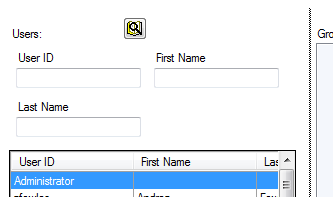
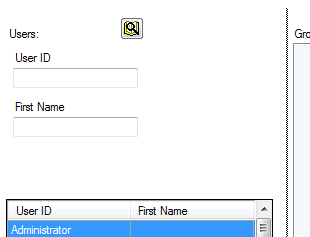
The software programmer has added a feature to the program as requested but the feature contains a minor flaw.  The programmer has spent four hours trying to eliminate the flaw with no success.  As shown in the images, the flaw is a visual flaw.  When the screen is resized to a smaller size, one of the input fields vanishes.  But any subsequent resize causes the missing field to re-appear.


Should the programmer continue to fix the flaw?  None of the programmers has any ideas for how to fix the flaw, they have already researched and tried everything they can think of.  No time estimate can be made for the fix; it might take 2 hours or it might be impossible to fix.

Your software has 5,000 users, but you estimate this feature will be used about once per day by 10 of those users on average, and if those users don’t resize the screen they won’t notice a problem.

  1. Do you have the programmer continue to work on the flaw for 8 hours and then re-assess the issue.
  2. Do you have the programmer spend 40 hours redeveloping the feature completely in a different way that hopefully will have no problems.
  3. Do you remove the feature from the code hoping to try to implement it again in a future iteration?
  4. Do you create a new ticket in the bug tracking system to address the problem in the future, or do you leave it unrecorded and hope it is never reported.
  5. If you create a new ticket in the bug tracking system, do you include the bug in the list of known bugs in the application?
  6. Do you tell your quality assurance team to ignore the bug; to not report it as a bug.

This challenge is typical of the decisions that need to be made every day in software development.  I don’t believe there is a correct or best answer to this scenario.  Perhaps you have a junior programmer doing the work and you feel it would be good for him to spend a few days trying to resolve the problem.  Or, perhaps the project is behind schedule and you have several more valuable features to complete so you decide to leave this one as is.  Or perhaps you software has been critiqued severely lately for releasing code with bugs so you decide it best to take this feature out to reduce further stains on your reputation.  There are many factors that go into making this decision and I’m sure I cannot think of all of them.  Can you?

Posted in Project Management | 1 Comment »

There are no I.T. Projects, only Business Projects

Posted by robkraft on October 28, 2012

Businesses often turn to software and computers to solve problems and gain a competitive edge.  When this occurs, both the business analysts and the I.T. staff have a solution in mind that requires computing technology and software.  Sometimes though, non-technical solutions solve problems better and with far less expense.  One current classic example is the use of a white board to track the project of work being done during a software development iteration.  That white board does not need to be electronic, so don’t spend weeks or months creating the white board software especially when all interested parties are located in the same office or room.

Keep in mind these three principles:

  • Can we try out the new process or idea manually, with minimal investment, without spending the time to develop the idea using software.  If we feel the process still requires automation after a few months, can we at least learn some of the requirements from performing the process manually in the first few months.
  • Is the cost of developing the software the best use of our scarce resources?  If purchasing a software solution, is the cost of the purchase worth the investment?  Many companies spend a lot of resources developing software that is not part of their core business.  Doing so is depriving your business of the resources it could be using to better the products that really drive the business.
  • Just because your software developers are busy does not mean you are making progress.  I once learned of a doctor that traveled an hour between two hospitals.  He saw four patients a day because he spent four hours traveling back and forth.  The doctor was constantly busy, but the doctor was not near as productive as he could have been.  Once the doctor changed the schedule of the patients to meet all the patients at one hospital in the morning, and all the patients at the other hospital in the afternoon, the doctor was able to see twice as many patients each day.

Posted in Process, Project Management | Leave a Comment »

How to POST to a REST API using Fiddler

Posted by robkraft on October 24, 2012

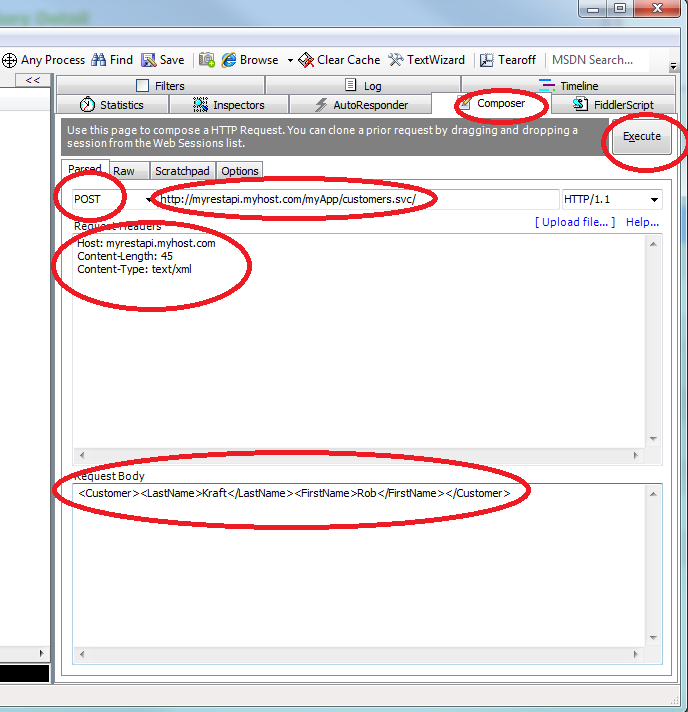
Posting to a REST API using Fiddler is very simple, as long as you fill out all the required values correctly. I spent more than an hour figuring out the correct info for my REST API recently so I am documenting it here for my own sake, and hopefully to speed the resolution for others. The URL shown in the image is not real, so don’t expect that URL to work for yourself.

  1. Select the Composer tab in Fiddler.
  2. Select POST from the dropdown.
  3. Enter the URL of the REST API. My REST API had a .svc extension, but most REST APIs do not.
  4. In the Request Headers, include “Content-Type: text/xml”. This is the step I missed that took me so long to resolve. Your REST API may not need this, but the REST API I was working with developing on the Microsoft Stack did. You do not need to provide the values for Host or Content-Length in your Request Headers because Fiddler will populate those for you.
  5. In the Request Body, provide the XML or Json data that you are sending to the URL as part of the POST.
  6. Click on the Execute button.
  7. Check the panel on the left (not shown in the image) to see the result of your API call. For my API, the POST returned a 200 and the Response Body contained my response data.

That’s it. Good Luck!

How to POST to a REST API using Fiddler

Posted in CodeProject, Coding, Free tools | 7 Comments »

Use BCrypt to Hash Your Passwords: Example for C# and SQL Server

Posted by robkraft on October 9, 2012

By now you know passwords should be stored using a hash.  Given your decision to do the right thing and hash your passwords you still have to decide some implementation details.

First, choose a hashing algorithm.  Choose BCrypt.  Why BCrypt?  I’ll give you two reasons:

  1. It is slow, and slow is good because it thwarts brute-force attacks (read more here: http://security.stackexchange.com/questions/4781/do-any-security-experts-recommend-bcrypt-for-password-storage).
  2. The output from BCrypt is a Base-64 alphabet (http://tools.ietf.org/html/rfc4648#section-4) which means there are no characters that are tricksy to store in a simple character field; CodePage is irrelevant.

Second, find a reliable implementation of BCrypt.  I am going to show an example of using C#.Net and SQL Server, but here is a good reference I found using  PHP and MySQL (http://oscarm.org/2012/6/using-bcrypt-store-passwords).  I also say a “reliable implementation” because there are flaws in some implementations, such as one discovered in 2011 and discussed in these articles (http://en.wikipedia.org/wiki/Crypt_(Unix)http://www.digipedia.pl/usenet/thread/16234/200/ (Search for $2y$) in this second article. – $2y$ indicates you are using a version of BCrypt for Unix that does not contain this bug).

I am using Derek Slager’s C# implementation of BCrypt downloaded from here:
http://derekslager.com/blog/posts/2007/10/bcrypt-dotnet-strong-password-hashing-for-dotnet-and-mono.ashx.  Based on a little testing I did myself, I believe it does not contain the flaw cited in the above article, but I am no expert at this.  Even if the bug discovered in 2011 exists in this implementation of BCrypt, it is of little concern to me as all of my users are located within the U.S. and are extremely unlikely to be using password characters that cannot be directly entered from a standard keyboard (characters with ASCII values greater than 127).  And even if a user does have such a password, the attack vector remains incredibly tiny for exploitation.

Third, understand the inputs and outputs.  BCrypt includes a method to generate a salt.  When the salt is applied to the password, the resulting hash holds the original salt and the hashed password.  You can store the salt and password combined in a CHAR(60) field in your database.  You don’t need to store the hashed password separately from the salt, nor should you, since the BCrypt class contains a method that expects the salt and password combined to be passed in as a parameter when later confirming the correctness of the user-entered password.

Note, the salt always begins with something like $2a$10$ meaning version 2a of BCrypt and 10 rounds of computations.  10 rounds is the default.  You can choose larger numbers to make it slower, or smaller numbers to make it faster, but 10 is a really good choice for most of us.  Since the rest of the salt is 22 bytes, and the $2a$10$ is 7 bytes for a total of 29 bytes, the hashed password is always the remaining 31 bytes.  The total length of the output that you will store in the database is always 60 bytes long.

<br>
string myPassword = "password";<br>
string mySalt = BCrypt.GenerateSalt();<br>
//mySalt == "$2a$10$rBV2JDeWW3.vKyeQcM8fFO"<br>
string myHash = BCrypt.HashPassword(myPassword, mySalt);<br>
//myHash == "$2a$10$rBV2JDeWW3.vKyeQcM8fFO4777l4bVeQgDL6VIkxqlzQ7TCalQvla"<br>
bool doesPasswordMatch = BCrypt.CheckPassword(myPassword, myHash);<br>

Each password stored will have a different salt, and every time a user changes their password you will generate a new salt for the user.  I also encourage you to add a little hard-coded salt to the password.  This hard-coded salt adds a little more challenge to brute force attacks from hackers that steal your database, but have not stolen your code and don’t have the hard-coded salt.

<br>
private void SetPassword(string user, string userPassword)<br>
{<br>
   string pwdToHash = userPassword + "^Y8~JJ"; // ^Y8~JJ is my hard-coded salt<br>
   string hashToStoreInDatabase = BCrypt.HashPassword(pwdToHash, BCrypt.GenerateSalt());<br>
   using (SqlConnection sqlConn = new System.Data.SqlClient.SqlConnection(...)<br>
   {<br>
     sqlConn.Open();<br>
     SqlCommand cmSql = sqlConn.CreateCommand();<br>
     cmSql.CommandText = "UPDATE LOGINS SET PASSWORD=@parm1 WHERE USERNAME=@parm2";<br>
     cmSql.Parameters.Add("@parm1", SqlDbType.Char);<br>
     cmSql.Parameters.Add("@parm2", SqlDbType.VarChar);<br>
     cmSql.Parameters["@parm1"].Value = hashToStoreInDatabase;<br>
     cmSql.Parameters["@parm2"].Value = user;<br>
     cmSql.ExecuteNonQuery();<br>
   }<br>
 }</p>
<p>private bool DoesPasswordMatch(string hashedPwdFromDatabase, string userEnteredPassword)<br>
{<br>
    return BCrypt.CheckPassword(userEnteredPassword + "^Y8~JJ", hashedPwdFromDatabase);<br>
}<br>

Another reference to BCrypt compared to SHA512:
http://stackoverflow.com/questions/1561174/sha512-vs-blowfish-and-bcrypt
.

Update for 2022: Some algorithms are now better than BCrypt because they are more difficult (take more time) to brute-force crack. Argon2 is the best, and PBKDF2 is also really good. However, only PBKDF2 is in .Net Core (or so I’ve read), and if you find an Argon2 library on github (or elsewhere), you have to decide for yourself if it is trustworthy and correctly implmeneted.

Posted in Code Design, CodeProject | 4 Comments »

 
Design a site like this with WordPress.com
Get started